Azure Virtual Desktop Support for External Identities Without FSLogix (Preview) – Part I
Microsoft continues to expand the flexibility and reach of Azure Virtual Desktop (AVD) with new preview capabilities. One of the most impactful announcements is the support for external identities in Azure Virtual Desktop. This feature enables organizations to securely extend AVD resources to users outside their core Azure Active Directory tenant—such as partners, contractors, or customers—without needing complex workarounds.

However, in this preview stage, there is one notable limitation: FSLogix profiles are not supported for external identities. Let’s break down what this means, why it matters, and how organizations can take advantage of this feature while planning ahead for the future.
What Are External Identities?
External Identities allow organizations to collaborate with users outside their Azure AD (now Microsoft Entra ID) tenant. These could be:
- Contractors who need temporary access to a corporate desktop.
- Vendors or partners who require access to certain applications or datasets.
- Customers in a business-to-business (B2B) or business-to-consumer (B2C) scenario.
Traditionally, these users could be added as guest users in Azure AD through B2B collaboration. Now, with the new External Identities preview for AVD, you can directly assign these guest accounts to AVD application groups just like you would for internal employees.
This makes AVD a more inclusive platform, helping organizations onboard external stakeholders quickly without disrupting security or administrative processes.
How Does It Work in Azure Virtual Desktop?
From an administrative standpoint, nothing changes significantly. IT admins follow the same process used for assigning internal users:
- Add the external identity (guest user) to the organization’s Azure AD/Entra tenant.
- Assign the user to the AVD application group (for example, a pooled desktop host pool or a RemoteApp group).
- The user signs in via their home organization credentials (for instance, their company or personal Microsoft account).
- The external user can then access AVD resources securely through the Remote Desktop client or browser-based access.
This approach eliminates the need to provision separate user accounts or VPN access for external identities, reducing complexity while maintaining compliance.
The FSLogix Limitation in Preview
One major caveat in this preview is the lack of support for FSLogix profiles for external identities.
FSLogix is the standard profile management solution for AVD. It provides:
- Roaming profiles: Ensuring user settings, files, and configurations follow the user across sessions.
- Profile containers: Stored in Azure Files or Azure NetApp Files for fast, consistent logons.
- Office 365 container support: Enabling smooth performance for Outlook, OneDrive, and Teams in AVD.
Without FSLogix, external users will not have persistent profiles. This means:
- Every session is essentially a temporary environment.
- Profile customizations, documents, and settings do not persist between logons.
- External users get a “fresh” profile every time they connect.
Why Is FSLogix Disabled for External Identities?
This limitation exists because external identities use a different authentication and identity flow than standard internal accounts. FSLogix relies heavily on seamless integration with Active Directory or Azure AD-joined session hosts to create and mount profile containers. In the preview stage, these dependencies are not yet extended to external identities.
In other words, the underlying plumbing between FSLogix and external identity sessions is not finalized. Microsoft may enable this in a future release, but for now, organizations must carefully design their AVD experience for external users around this limitation.
Scenarios Where This Preview Is Useful
Despite the FSLogix limitation, there are several scenarios where supporting external identities is still very beneficial:
- Short-Term Contractors
Contractors working for a few weeks or months may not need persistent profiles. They just need access to applications in a secure, isolated desktop environment. - Application Access for Partners
If partners only need to access a line-of-business application hosted on AVD, the lack of FSLogix is not a blocker. Their settings and sessions can reset without major disruption. - Customer Training Environments
Organizations delivering product demos or training sessions can provision external users into AVD quickly without worrying about profile persistence. - BYOD (Bring Your Own Device) Collaboration
External users accessing AVD from personal or non-managed devices can connect securely without requiring complex domain joins.
Scenarios Where FSLogix Is Critical
On the other hand, some use cases may not be ideal until FSLogix support arrives for external identities:
- Long-term partner engagements where consistent profiles and settings are essential.
- Knowledge workers who rely on Office apps, Teams, or OneDrive within AVD.
- Persistent desktop scenarios where session customization is critical.
In these cases, organizations may want to wait for full FSLogix support before rolling out external identities broadly.
Licensing Considerations
It’s important to understand the licensing implications of AVD external identity support:
- AVD Licensing: External users must still be properly licensed to access Azure Virtual Desktop resources. This typically means having eligible Microsoft 365 or Windows licenses.
- Azure Infrastructure Costs: You will still incur Azure compute, storage, and networking costs for host pools, just like internal users.
- No Licensing Exemption for External Identities: External identity users are treated the same as internal ones for licensing and cost purposes.
Microsoft provides guidance on AVD licensing to ensure compliance. Organizations should review this carefully before onboarding external users.
Best Practices for Using External Identities Without FSLogix
If you plan to adopt this preview feature, here are some best practices:
- Define User Personas
Clearly identify which external users truly need AVD access and whether they require persistent profiles. - Limit Access to Stateless Use Cases
Use external identities for scenarios where session persistence is not critical. - Educate Users
Inform external users that their settings and files will not persist between sessions. - Enable Cloud Storage Alternatives
Encourage use of SharePoint Online or OneDrive web access for storing documents, instead of relying on desktop profiles. - Secure Access with Conditional Access
Use Microsoft Entra Conditional Access policies to ensure external identities meet compliance requirements (MFA, device compliance, etc.). - Monitor and Audit
Track external identity logons and usage in AVD to ensure proper governance.
What we understand so far?
The preview of external identities in Azure Virtual Desktop is an exciting step toward a more open and collaborative VDI platform. While the lack of FSLogix support is a limitation, it is reasonable to expect Microsoft to address this in future releases as customer feedback and demand increase.
In the meantime, organizations should leverage this capability for short-term, stateless, and collaboration-focused scenarios while continuing to rely on traditional AVD setups with FSLogix for internal users and long-term external engagements.
What’s Next
In part II of my blogpost include a PowerShell walkthrough showing how to add an external identity and assign it to an AVD app group.
Part II of this blog you can read here.
That’s all for today, have a great day ahead.

Optimizing FSLogix Deployment for Azure Virtual Desktop (AVD) with PowerShell Automation Part – 1
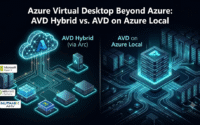
Azure Virtual Desktop Beyond Azure: Compare AVD Hybrid vs. AVD on Azure Local

What is RDP Multipath and How to deploy it with Windows Registry, PowerShell, Intune or Ansible
About Author
