Azure Virtual Desktop Beyond Azure: Compare AVD Hybrid vs. AVD on Azure Local
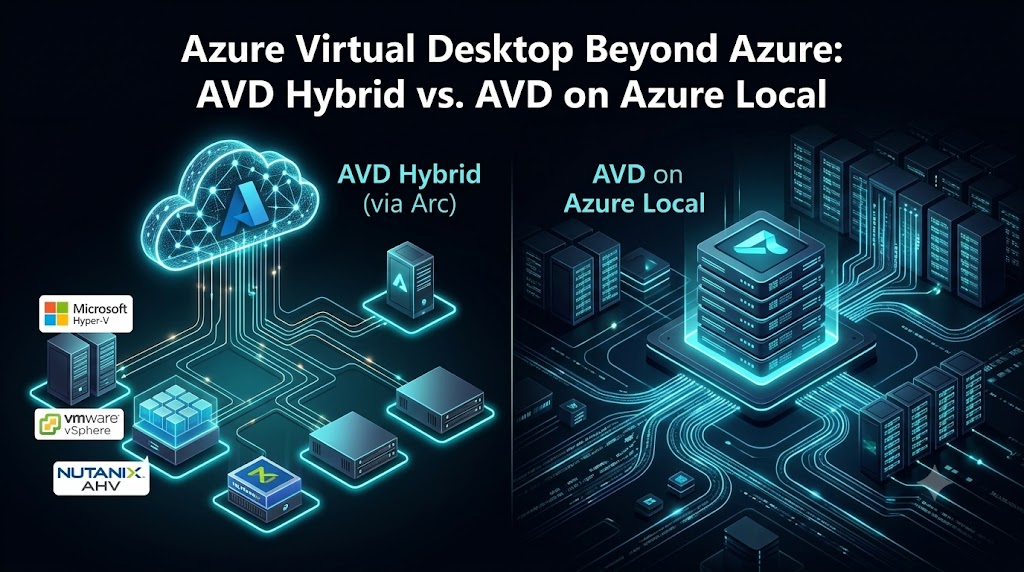
Azure Virtual Desktop (AVD) has traditionally meant one thing: session hosts running as Azure virtual machines, brokered by a control plane that also lives in Azure. That assumption no longer holds. Microsoft now documents two distinct ways to keep AVD session hosts outside a standard Azure VM: AVD Hybrid and AVD on Azure Local. They get talked about interchangeably as “on-prem AVD,” but they are different architectures with different capabilities — and the gap between them matters a lot if you’re designing or automating around either one.
The traditional model, for reference
In the standard deployment, the AVD control plane (host pools, workspaces, application groups, brokering) runs in Azure, and session hosts are Azure VMs joined to that control plane. Windows 10/11 Enterprise multi-session is the capability most organizations lean on here — it lets many users share one Windows instance, which is what makes AVD’s density and cost story work.
Plenty of organizations can’t put every workload there — data residency, legacy application dependencies, low-latency access to on-prem systems, existing datacenter investment, or regulatory constraints all push workloads back toward on-premises infrastructure. That’s the gap both AVD Hybrid and AVD on Azure Local are trying to close, from different directions.
AVD Hybrid: bring your existing infrastructure to AVD
AVD Hybrid keeps the AVD service in Azure and extends it to session hosts running on infrastructure you already own — any on-premises hypervisor or a physical (bare-metal) Windows Server. The mechanism is Azure Arc: you deploy the machine, Arc-enable it, then run the AVD Arc extension, which installs the AVD components and registers the device with a host pool.
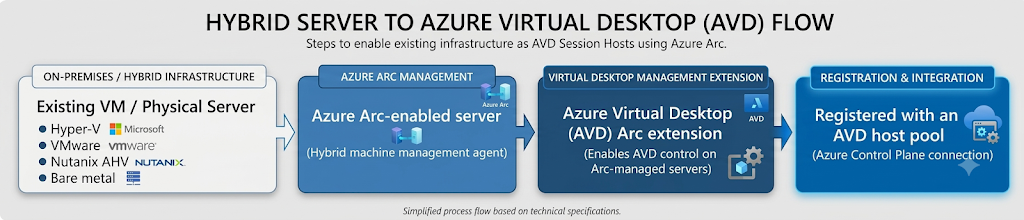
You keep using whatever you already use to provision the machine — hypervisor management tools, scripts, SCCM, partner tooling. AVD Hybrid doesn’t replace that; it only handles registering the finished machine with AVD.
What it doesn’t do yet?
This is the part worth being precise about, because it changes what you can design around it today:
- Windows 10/11 Enterprise multi-session is explicitly not supported on AVD Hybrid. Supported operating systems are Windows Server 2016–2025 (via RDS CAL/Software Assurance licensing) and single-session Windows 10/11 Enterprise — the latter on VMs freely, but on physical hardware only as a dedicated, headless, rack-mounted host; laptops and personal PCs aren’t supported.
- AVD Hybrid doesn’t provision or manage VM state. Power management, autoscale, Start VM on Connect, and Session Host Configuration are all unsupported — you own the host lifecycle.
- It’s Public Preview and currently only works with validation host pools. A production host pool will need to be redeployed once it reaches GA.
None of that makes it uninteresting — broad hypervisor support (Hyper-V, VMware vSphere, Nutanix AHV, bare metal) through a single Arc-based onboarding path is genuinely useful for RDS-style Windows Server workloads or single-session Windows desktops you want centrally brokered. But if Windows 11 multi-session on-premises is the requirement, AVD Hybrid isn’t there yet.
AVD on Azure Local: bring Microsoft’s Azure stack into your datacenter
AVD on Azure Local takes the opposite approach: instead of connecting arbitrary existing infrastructure, you run Azure Local (formerly Azure Stack HCI) — Microsoft’s own distributed infrastructure platform — in your datacenter, and deploy AVD session hosts as VMs on that cluster.
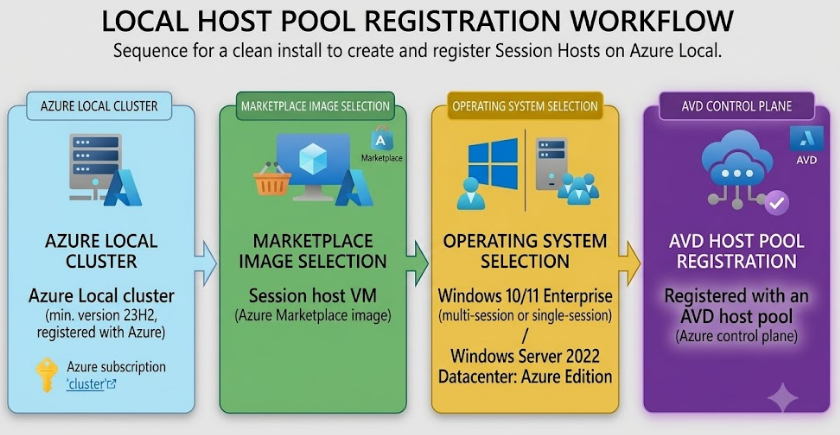
Because the underlying platform is Azure Local rather than “whatever hypervisor you already had,” this is a much closer to Azure-native experience: Marketplace images, Azure verification for VM activation, and the same portal-driven management model you’d use for Azure-hosted hosts.
The multi-session differences
This is the detail that most affects design decisions: AVD on Azure Local supports Windows 10 and Windows 11 Enterprise multi-session, plus Windows Server 2022 Datacenter: Azure Edition, alongside the standard single-session options. That’s the density and licensing model most AVD deployments are actually built around, and it’s available on-premises here in a way it currently isn’t through AVD Hybrid.
One constraint worth flagging for host pool design: a host pool can’t mix session hosts on Azure with session hosts on Azure Local — each host pool has to be one or the other.
Side-by-side Comparison.
| Capability | AVD Hybrid | AVD on Azure Local |
| AVD control plane | Azure | Azure |
| Session host location | Existing hypervisor or bare-metal server (Hyper-V, VMware vSphere, Nutanix AHV, physical) | Azure Local cluster (min. version 23H2) |
| Connectivity mechanism | Azure Arc-enabled servers | Azure Local’s own Azure-registered infrastructure (Arc-based under the hood) |
| Windows 10/11 Enterprise multi-session | Not supported | Supported |
| Windows 10/11 Enterprise (single-session) | Supported on VMs; on physical hardware only as dedicated headless/rack-mounted hosts | Supported |
| Windows Server session hosts | Supported (2016, 2019, 2022, 2025) via RDS CAL/licensing | Supported, incl. Windows Server 2022 Datacenter: Azure Edition |
| Power management / autoscale / Start VM on Connect / Session Host Configuration | Not supported — you manage host lifecycle yourself | Supported |
| VM provisioning | Your own tooling (hypervisor console, scripts, SCCM, partner tools) | Azure-native, via Azure Marketplace images and Azure Local management |
| Mixing with Azure-hosted hosts in one host pool | N/A — separate host pool model | Not supported — a host pool can’t mix Azure and Azure Local hosts |
| Current status (Aug 2026) | Public Preview — validation host pools only | Generally available |
Why this matter for an AVD control plane?
If you’re building or extending automation around AVD, the tempting shortcut is a single boolean: Provider = Azure vs. Provider = On-Prem. Given the differences above, that abstraction breaks quickly — an on-prem session host might mean an Arc-registered VMware VM with no autoscale and no multi-session, or it might mean an Azure Local VM with the full Azure-native feature set. Those need different assumptions baked into provisioning, capacity planning, and lifecycle automation.
A cleaner model treats infrastructure as its own layer, with AVD orchestration sitting above it:

Each provider implementation exposes the same basic operations — create, delete, start, stop, get status — while the AVD orchestration layer stays provider-neutral and simply routes “provision a session host” to the right workflow:

The practical payoff: your control plane can expose one operation (“provision session host”) to the user while internally respecting the real capability differences — refusing to offer multi-session on an AVD Hybrid target, for instance, instead of silently failing at deployment time.
The takeaway
AVD Hybrid brings your existing infrastructure into AVD via Azure Arc, with broad hypervisor reach but no multi-session and no host-lifecycle automation yet. AVD on Azure Local brings Microsoft’s own Azure infrastructure stack into your datacenter, trading “use whatever you already have” for the full Azure-native feature set, including multi-session. They solve the same problem — AVD session hosts outside a standard Azure VM — at different layers, and treating them as one generic “on-prem” option in your architecture or automation will cost you later. Treat them as separate infrastructure providers from the start.
AVD Hybrid is Public Preview and only supported on validation host pools; capability gaps such as multi-session and autoscale support may close before GA. Re-verify against Microsoft Learn before locking in a production design.
Note: This article is based on Public Preview, Public Preview features change quickly. The details below reflect Microsoft Learn documentation as of late August 2026 — re-check hybrid-overview and azure-local-overview before you design against them, especially once AVD Hybrid reaches GA.

MSIX App Attach vs. App Attach for Azure Virtual Desktop (AVD)

Optimizing FSLogix Deployment for Azure Virtual Desktop (AVD) with PowerShell Automation Part – 1

Gartner’s 2025 Magic Quadrant for DaaS: A Microsoft MVP’s Review
About Author
