With the rise of remote work and distributed teams, personalized desktop experiences are becoming more critical. Azure Virtual Desktop (AVD) offers flexible deployment options, including personal host pools where users get dedicated virtual machines (VMs) assigned to them. Azure Virtual Desktop (AVD) supports various host pool types, and one of the most user-specific options is
Have you ever found yourself overwhelmed by the complexity of setting up Azure Virtual Desktop (AVD)? Or wished there was a quicker way to test AVD without going through all the manual configurations? Trust me, I’ve been there. Getting a full AVD environment up and running can be time-consuming and tedious. That’s why Microsoft’s AVD
If you have migrated your VDI resources in Azure, you can still check out for Global Service Outage Alerts. You can monitor global outage alerts for Azure, Microsoft 365, and Citrix services through their respective status pages: Azure: Visit the Azure status page for a global overview of Azure service health. For a personalized view
In March 2025, we saw massive improvement in AVD Drive Redirection Performance. What is this improvement? When a user opens or lists the contents of a redirected drive, the remote session enumerates files and folders of the current directory. If you have a large number of files and folders on the redirected drives, the enumeration
When preparing a golden image for Azure Virtual Desktop (AVD), one of the critical steps is generalizing the Azure VM. Generalizing the VM ensures that the image can be used to create multiple virtual machines without retaining user-specific information or settings. This process is essential for maintaining consistency and scalability in your AVD environment. In
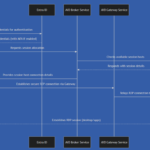
Fig: End-to-end login process in Azure Virtual Desktop. In any AVD interview, one of the most common questions is to describe the end-to-end sign process of a user in Azure Virtual Desktop. Today I am going to show you this login process in detail. Let’s see how it works. When a user logs in to
When deploying Azure Virtual Desktop (AVD) environments, default Windows images often contain unnecessary pre-installed applications (bloatware) that can impact performance and user experience. To streamline the optimization process, I have created a PowerShell script that identifies all virtual machines (VMs) in an AVD Host Pool and executes a bloatware removal script on each VM. In
In my previous blog post, Optimizing FsLogix Deployment for Azure Virtual Desktop (AVD) with PowerShell Automation – Part 1, I demonstrated how to streamline FsLogix deployment using PowerShell. While PowerShell is a powerful automation tool, Python offers greater flexibility, especially when integrating with cloud-based APIs, CI/CD pipelines, and third-party services. In this blog, I’ll walk
Automating Windows Updates for Azure Virtual Desktop (AVD) Golden Image Keeping your Azure Virtual Desktop (AVD) Golden Image up to date is essential for security, stability, and performance. While the Windows Update interface provides an easy way to install updates, automating the process using PowerShell ensures that your Golden Image remains optimized and compliant before
Introduction Deploying and managing FSLogix for Azure Virtual Desktop (AVD) is essential for ensuring seamless user profile management. However, manual installation and configuration can be time-consuming and prone to errors. This blog post introduces a PowerShell script that automates FSLogix installation, enhances reliability, and applies best practices for AVD. What is FSLogix? FSLogix is a
As we bid farewell to 2024, it’s time to reflect on the incredible journey of Azure Virtual Desktop (AVD) this year. From transformative updates to subtle refinements, Microsoft has elevated AVD as a cutting-edge solution for virtualization and remote work. The platform has seen robust advancements in scalability, user experience, security, and sustainability, reinforcing its
In today’s fast-paced digital world, the migration to modern application packaging formats represents a significant challenge for organizations with extensive application portfolios. As enterprises strive to embrace MSIX—a contemporary and efficient packaging format—the looming April 2026 deprecation deadline adds pressure on IT professionals. To alleviate these concerns, Microsoft has introduced a groundbreaking update that promises
Managing connectivity for Windows 365 and Azure Virtual Desktop (AVD) is critical to ensuring seamless user experiences. VPN solutions often require up-to-date Gateway IPs or CIDR subnets to avoid Cloud PC performance degradation and connectivity issues. The Windows 365 and AVD Gateway IP Address Lookup Script simplifies this process. It retrieves and outputs the Gateway
Microsoft has released Windows 11, version 24H2 images in the Azure Marketplace in Oct. 2024, providing users with the latest version of Windows 11 optimized for virtualized environments and offering enhanced features. These new images cater to organizations looking to deploy Windows 11 VMs for workloads in Azure. Here’s a closer look at what this
Today I am going to do a comprehensive review of the result of the 2024 Gartner Magic Quadrant for Desktop as a Service (DaaS). The report was published on 16th of Sept. 2024. As the shift to remote and hybrid work becomes permanent, the DaaS market continues to expand. Gartner’s 2024 Magic Quadrant for DaaS
Sometimes, your users may report that Citrix HDX Optimization isn’t working in their virtual desktop infrastructure (VDI) environment. A common indicator is seeing the message “HDX not connected” when they check the About dialog box in Microsoft Teams. This above image is an example when Citrix VDI has been deployed in AVD (Azure Virtual Desktop)
Configuring session lock behavior in Azure Virtual Desktop (AVD) is critical for organizations to manage and secure remote access effectively. This new feature is released in August 2024. Azure Virtual Desktop provides users with a robust platform to access their virtual machines, while administrators ensure that these environments are secure and compliant with company policies.
Creating custom image templates for Azure Virtual Desktop (AVD) streamlines and optimizes the deployment of virtual machines (VMs) by standardizing configurations across a workspace. This blog will walk through the process, advantages, and best practices for utilizing custom image templates, focusing on how this tool can benefit IT teams in configuring and maintaining efficient virtual
FlexApp is a dynamic application-layering technology that simplifies the deployment and management of applications within virtualized environments, such as Citrix DaaS (Desktop as a Service). This blog will dive deep into what FlexApp packages are, how they are deployed, and their significance in modern IT environments. What is FlexApp? FlexApp is a solution designed by
Organized the Azure Virtual Desktop and Windows 365 Awareness Session On the 29th of July 2024, I participated in Azure Virtual Desktop and Windows 365 Awareness Session. Organized by: Azure Bangladesh Community Event Highlights: Speakers: Aavisek Choudhury, Microsoft MVP Jitesh Kumar, Microsoft MVP Uddhave Jajoo, Citrix CTA Session Focus: Understanding the capabilities and benefits of
Microsoft Teams has become an indispensable tool for collaboration, and its integration with Azure Virtual Desktop (AVD) has brought even greater flexibility for remote work. Recently, in June 2024, Microsoft introduced some exciting changes in the preview for Teams, including the new SlimCore architecture. This blog will explore these changes, their benefits, and how to
In June 2024, Microsoft introduced a feature in Azure Virtual Desktop called Preferred App Group Type settings. This feature helps users streamline their feed display by showing only their preferred type of application group—either RemoteApp or Desktop—thus avoiding multiple simultaneous session connections and reducing connectivity issues. Also, it’s an enhancement that improves how resources are
I am thrilled to share some exciting news with you all. I have been honored with the prestigious Microsoft Most Valuable Professional (MVP) awards in not one, but two technology areas: Azure Virtual Desktop and Windows 365! This recognition is not only a personal milestone but also a testament to the incredible journey I have
Hello Friends, In May 2024, Microsoft has mentioned that Trusted Launch virtual machines are now available in Azure Government and Azure operated by 21Vianet., as we know that securing virtual desktops is crucial for protecting sensitive data and maintaining business continuity. Microsoft Azure offers a robust solution with its Azure Virtual Desktop (AVD) service, enabling
In today’s digital landscape, cost efficiency is a crucial aspect of managing cloud resources. Azure Virtual Desktop (AVD) provides a flexible and scalable solution for virtual desktop infrastructure, but it can also incur significant costs if not managed properly. One effective strategy to optimize costs is through VM hibernation. This blog will guide you through
Azure Virtual Desktop (AVD) is a comprehensive desktop and app virtualization service running in the cloud. One key aspect of AVD is the Windows client, which offers a plethora of features designed to enhance user experience and optimize performance. In this blog, I will delve into the key features of the Windows client for Azure
In an era where artificial intelligence (AI) is reshaping the landscape of IT management, Nerdio has taken a significant leap forward with the release of Nerdio Manager for Enterprise (NME) version 6.0. This update brings a suite of innovative AI-driven features designed to streamline operations, optimize costs, and enhance the overall efficiency of IT environments.