In any VDI environment, monitoring the performance of the overall environment is crucial to making sure all components are available and performing effectively to ensure users have a high-quality experience. There are number of tools available in the market that will provide Monitoring capabilities. Different components within the overall solution require monitoring of unique metrics
What is RBAC? When it comes to identity and access, most organizations that are considering using the public cloud are concerned about two things: Ensuring that when people leave the organization, they lose access to resources in the cloud. Striking the right balance between autonomy and central governance – for example, giving project teams the
Microsoft on 4th May has announced a forthcoming update to the Azure VMware Solution, which aims to make it easier and cheaper to migrate on-premises VMware workloads to Microsoft’s Azure cloud platform. The next-gen Azure VMware Solution is now in preview in the U.S. East and West Europe Azure regions, and general availability is targeted
Hello, readers hope you are all safe in this Covid-19 pandemic situation. For the last couple of months, I have got many requests to write about work from home solutions, and most of them are related to Citrix VDI deployment steps in Azure, so I have decided to start a 15 series blog to show
I know many of you are worried about the present Covid-19 situation and afraid of losing your jobs. Many of my friends have asked this questions to me during the entire lockdown period in India. I feel if you are a cloud engineer or admins and if you are afraid of job loss due to
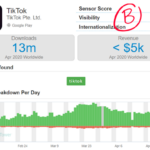
Interesting to note that the Worlds number 1 Video Sharing App TikTok has surpassed 2 billion downloads across android and ios devices. Last December they have reported 1.5 billion downloads. And now, they have added another 50 million users in the last three months. In the last month, TikTok has reported 13 million downloads. As
As you know most of the enterprises have already deployed the ExpressRoute circuits in different regions in Azure across the Globe. But due to Covid-19 when there is a surge in WFH scenarios there are few use cases like Citrix VDI infrastructure in Azure IaaS, in this case, due to huge load users started complaining
If you believe Azure CLI is based on bash which should automatically installed in Ubuntu then you are wrong. The Azure command-line interface (Azure CLI) is a set of commands used to create and manage Azure resources. The Azure CLI is available across Azure services and is designed to get you working quickly with Azure,
In my last post here I have shown you how you can create a PowerShell docker image in your Ubuntu Server in Azure. Today I will show you how you can directly pull the docker image from docker hub. Picture Credit: Pexels.com In first Step you need to pull the docker image. docker pull mcr.microsoft.com/powershell:latest
Hello everyone, in the last six months I have seen lots of talks regarding administrating the Azure from Ubuntu and many were asking about the steps to create a docker image with PowerShell Core installed and Az module pre-installed in it. So I have created this post for them to go through the below steps.
In large enterprises, we have seen that the limit of 5 TiB Azure File Storage is not sufficient, and we sometimes need a huge file share due to backup or another requirement. However, as you all may know that by default, Azure standard file shares can span only up to 5 TiB, although the share
Today I will show you how you can install PowerShell Core in the Ubuntu Linux VM. If you are from Linux background and want to manage workloads in Azure it’s very important that you should install PowerShell Core in Linux VM and later you can import the Az Module. You can follow this post for
I have started writing about many PowerShell scripts in my blog after I get the request from many frequent blog followers who are connected with me on the various social platforms. Today I will show you how you can create files in Powershell.You can create a file with the following command.New-Item This below command will
O365 which is recently renamed as Microsoft 365, however it has been used in most of the corporates for a long time now. To know the users license count is one of the important task which is very common for most of the O365 admins. Here is a script written by me which can give
I got queries from many beginners to know how they can connect Azure from PowerShell. I am assuming you have already installed the Az Module and using PowerShell Core. Here is the simple command for your reference. The below command will connect to your Azure Account and it will connect to the default subscription. Connect-AzAccount
Azure VM monthly cost reporting is very important for most of the Azure Admins nowadays and you should know how to get the data from the Azure with the help of PowerShell script. You should use the new Az-Module for this task. You can find the consumption details of the Azure VM’s with the help
Hi friends, today I will show you the solution of a common error when you plan to start working with Azure Services which you have never used before in your Azure Subscription. There are many services in Azure which is not available initially unless you register them for example Azure Data Factory, Blockchain etc. In
Hi friends, for a long time I was not able to publish my articles in this portal due to work related commitmet. In my today’s post I will show you how you can easily delete orphan resources in Azure. Let’s see how it works, in any enterprise you may have multiple subscription. Once you login
Happy New Year to all my blog readers, for many months I was busy with Azure Projects so unable to write any blog post. In mid of 2019, lately I have started working with Terraform. Once you have completed the Terraform installation you can verify it by running the below command. Terraform Once you verify
Azure Accelerated networking enables single root I/O virtualization (SR-IOV) to a VM, greatly improving its networking performance. This high-performance path bypasses the host from the datapath, reducing latency, jitter, and CPU utilization, for use with the most demanding network workloads on supported VM types. Now if the azure accelarated networking is enabled you can’t resize
Dear Friends, as you are aware PowerShell 7 Preview has been released recently. PowerShell 7 was designated to become the replacement product for PowerShell Core 6.x products as well as Windows PowerShell 5.1, which is the last supported Windows PowerShell version and now you can install the PowerShell 7.0 Preview in your computer by running
Picture Credit: Pexels.com Today I will show you how we can encrypt the disks of an azure VM. Encrypion of VM now a days becoming a compliance requirement and all the enterprises are following one or the other way to encrypt their servers. Azure Disk Encryption helps protect and safeguard your data to meet your
As you are aware in my last post I have written about the first part of migrating a SQL database to SQL Managed instance with the help of Data Migration Service. The post you can read here. Today I will show you how you can actually migrate the database. As you have seen in the
Today I have completed the AZ-301 & AZ-300 exam I have already completed earlier. After passing these two exams I have successfully completed the requirements to be recognized as a Microsoft Certified Azure Solutions Architect Expert. This was something which is long due.
As you are aware in my last post I have shown you the steps to create the Azure SQL Managed instance, today I will show you how you can migrate SQL databases easily to SQL managed instance. For our PoC we have used the Azure DMS tool. What is Azure Data Migration Service? Azure Database
In August 2018, I have written a blog post regarding Azure SQL Managed Instance which you can read here. This blog post has more than 2700 views so far and has been referred in other blogs as well. Today in this post I am going to show you how quickly we can create SQL managed
When I was young, Dr. Albaan Hello Africa was one of my top favorites. I don’t remember how many times I have listened to that Album. As an Indian from that time I have grown lots of curiosity about Africa and started reading lots of books (the Internet was not available during that time) about